Showing posts with label Gmail. Show all posts
Showing posts with label Gmail. Show all posts
Sep 11, 2014
5 million ‘compromised’ Google accounts leaked

Rt.com - A database of what appears to be some 5 million login and password pairs for Google accounts has been leaked to a Russian cyber security internet forum. It follows similar leaks of account data for popular Russian web services.
The text file containing the alleged compromised accounts data was published late on Tuesday on the Bitcoin Security board. It lists 4.93 million entries, although the forum administration has since purged passwords from it, leaving only the logins.
The accounts are mostly those of Google users and give access to Gmail mail service, G+ social network and other products of the US-based internet giant. The forum user tvskit, who published the file, claimed that 60 percent of the passwords were valid, with some users confirming that they found their data in the base, reports CNews, a popular Russian IT news website.
Google Russia said it is investigating the alleged leak, adding that it advises customers to use strong passwords and enable two-step login verification to protect their accounts.
The leak comes just days after similar leaks affected Mail.ru and Yandex, both popular Russian internet services. The previous leaks contained 4.66 and 1.26 million accounts respectively.
Both companies said that an overwhelming majority of the accounts listed were either obsolete, suspended for suspicious behavior or non-existent. They insisted that their own databases were not compromised and suggested that the leaked data was accumulated over years through phishing and other forms of hacking attacks on users.
The text file containing the alleged compromised accounts data was published late on Tuesday on the Bitcoin Security board. It lists 4.93 million entries, although the forum administration has since purged passwords from it, leaving only the logins.
The accounts are mostly those of Google users and give access to Gmail mail service, G+ social network and other products of the US-based internet giant. The forum user tvskit, who published the file, claimed that 60 percent of the passwords were valid, with some users confirming that they found their data in the base, reports CNews, a popular Russian IT news website.
Google Russia said it is investigating the alleged leak, adding that it advises customers to use strong passwords and enable two-step login verification to protect their accounts.
The leak comes just days after similar leaks affected Mail.ru and Yandex, both popular Russian internet services. The previous leaks contained 4.66 and 1.26 million accounts respectively.
Both companies said that an overwhelming majority of the accounts listed were either obsolete, suspended for suspicious behavior or non-existent. They insisted that their own databases were not compromised and suggested that the leaked data was accumulated over years through phishing and other forms of hacking attacks on users.
Jun 2, 2013
Gmail's new killer feature: Spam blocking 2.0
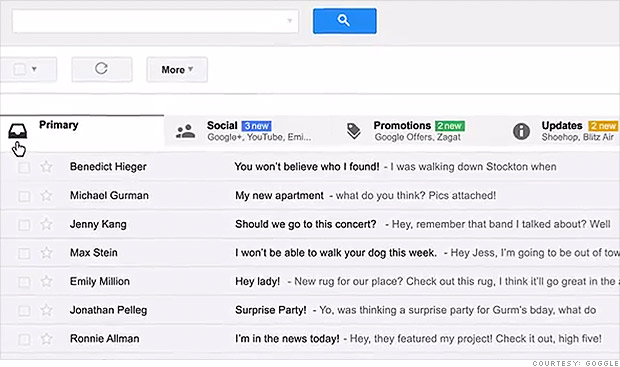
Cnn.com - Over the next week, millions of Gmail users will notice that something's changed. Just like the web browser containing it, Gmail will have tabs.
But it won't be tabs for handling different accounts. Instead, the tabs will represent the new auto-sorting powers Google's Gmail has been granted in an attempt to make your email more useful. You might say it's an evolution of the spam blocker.
Leveraging years of data collection from Gmail accounts, Google will be able to take notifications from services like Facebook and Twitter and file them away in a folder titled Social. Groupon deals and the never-ending onslaught of email from Fab will be tucked away in the Promotions folders.
All those bills, receipts, and nagging reminders you don't really want to deal with? Updates folder. And for those who still use message boards and mailing lists, there's a folder for any emails from that corner of the internet.
The amount of email we all get has gone way up. But as our methods of communicating electronically have become more varied, we receive far fewer emails we actually care about -- emails that can get lost in the flood of knockoff Cialis offers.
With the updated Gmail, which Google unveiled earlier this week, what should theoretically remain is an inbox of email you actually want to look at.
Google has tried for years to supply tools to make email less painful. It introduced the aforementioned spam filters, a Starred email folder, and an auto-populating Priority Inbox, all in an attempt to reduce the noise. But aside from the spam filter, people haven't really latched on to any of the other solutions. And even with the spam filter, most people still have way too many emails.
When Mailbox, an app built on top of Gmail, was released for Apple's iOS earlier this year, it stood out for its simplistic approach and painless way for filing non-urgent mail.
Google is wise to build some of that sorting into the core experience of Gmail, but it's even smarter to move a step ahead and automate the process. Few companies arguably have more data and insights on the type of mail people really want to engage with, and if anyone is audaciously qualified to attempt such a feat, it's Google.
But it won't be tabs for handling different accounts. Instead, the tabs will represent the new auto-sorting powers Google's Gmail has been granted in an attempt to make your email more useful. You might say it's an evolution of the spam blocker.
Leveraging years of data collection from Gmail accounts, Google will be able to take notifications from services like Facebook and Twitter and file them away in a folder titled Social. Groupon deals and the never-ending onslaught of email from Fab will be tucked away in the Promotions folders.
All those bills, receipts, and nagging reminders you don't really want to deal with? Updates folder. And for those who still use message boards and mailing lists, there's a folder for any emails from that corner of the internet.
The amount of email we all get has gone way up. But as our methods of communicating electronically have become more varied, we receive far fewer emails we actually care about -- emails that can get lost in the flood of knockoff Cialis offers.
With the updated Gmail, which Google unveiled earlier this week, what should theoretically remain is an inbox of email you actually want to look at.
Google has tried for years to supply tools to make email less painful. It introduced the aforementioned spam filters, a Starred email folder, and an auto-populating Priority Inbox, all in an attempt to reduce the noise. But aside from the spam filter, people haven't really latched on to any of the other solutions. And even with the spam filter, most people still have way too many emails.
When Mailbox, an app built on top of Gmail, was released for Apple's iOS earlier this year, it stood out for its simplistic approach and painless way for filing non-urgent mail.
Google is wise to build some of that sorting into the core experience of Gmail, but it's even smarter to move a step ahead and automate the process. Few companies arguably have more data and insights on the type of mail people really want to engage with, and if anyone is audaciously qualified to attempt such a feat, it's Google.
Feb 24, 2009
Gmail Gets Twice as Useful with Multiple Panes/Inboxes

Gmail's latest Labs creation is one of the best yet: panes that let you create separate inboxes using filters and labels. Anal-retentive over-organizers of the world, rejoice!
Want to have a pane just for emails from your family? Or from a particular mailing list? You can easily split up threads from different people or groups or based on different subjects or anything you want. It's a great way to use filters to turn one email account into many. Brilliant.
To turn on Panes, just go to the Labs section of your Gmail settings and turn on Multiple Inboxes.

Subscribe to:
Posts (Atom)