Showing posts with label Android. Show all posts
Showing posts with label Android. Show all posts

Oct 24, 2016
Begini Cara Mengakses Menu Rahasia di Android
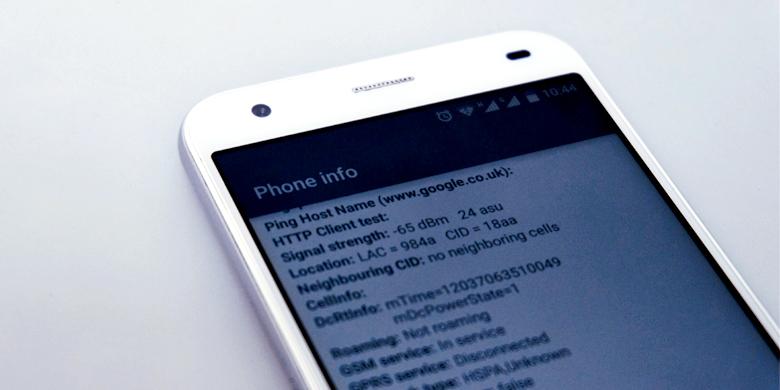
Kompas.com - Setiap ponsel Android sebenarnya memiliki menu rahasia. Menu ini ditujukan untuk para developer atau mereka yang paham dan hobi mengoprek gadget.
Oct 5, 2015
Kejutan, Google Rilis Tablet Pixel C
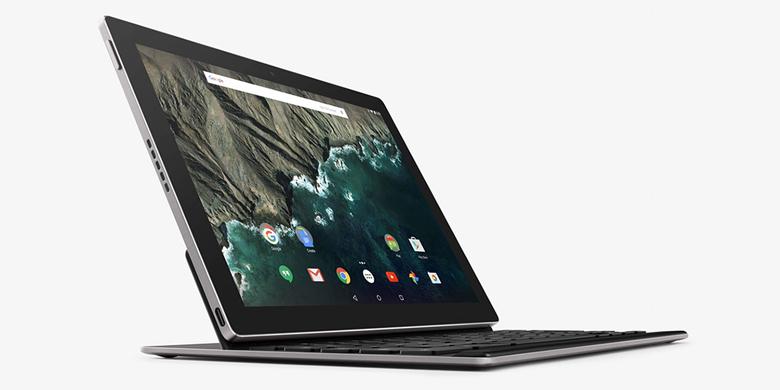
Kompas.com - Google punya kejutan di ajang peluncuran smartphone Nexus, Rabu (30/9/2015) malam. Selain merilis Nexus 6P dan 5X, raksasa internet tersebut juga memperkenalkan tablet pertamanya, Pixel C.
Jul 29, 2015
Text Message Could Hijack Your Android Phone

Tomsguide.com - All a hacker needs to get access to most Android phones is the telephone number tied to the device, according to security researcher Joshua Drake. Exploits Drake revealed today (July 27) don't require a user to open a corrupted website or download a malicious attachment; a phone simply needs to be able to accept texts and have Stagefright (Android's default media playback engine) installed.
Drake is the VP of Platform Research and Exploitation at Zimperium, a mobile-security firm based in Tel Aviv and San Francisco. A Zimperium company blog post stated that the Stagefright flaws are "the worst Android vulnerabilities discovered to date," due in part to how widespread Stagefright is. They estimate "95 percent of Android devices, an estimated 950 million devices," are at risk until a patch is applied.
Stagefright, which has been a part of Android the release of Android 2.2 Froyo in 2010, is still present in the current Android 5.1.1 Lollipop. Regarding the upcoming version of Android, Drake pointed out on Twitter that "Android M uses Stagefright," though he assured users that they should not worry, continuing by saying "I expect that the release version of Android M will ship with these bugs fixed already."
More recent versions of Android have been engineered to keep application data separated, but the further back one's device is in the platform's history, the more access hackers could gain to one's phone. The turning point for Android security seems to be around Android 4.1 Jelly Bean, with Zimperium noting that pre-4.1 devices "(roughly 11 percent of devices) are at the worst risk due to inadequate exploit mitigations."
(The Zimperium post noted that SilentCircle's Blackphone handset, which runs a customized, "hardened" version of Android called PrivatOS, was already protected against Stagefright exploits.)
While Google worked with Drake to deftly create a patch to fix the Stagefright flaws, users now need Android device manufacturers to push the update down to devices. Those who have watched carriers and manufacturers take ages to issue updates may not hold their breath waiting for the fix.
Not only are devices running older software more at risk, but according to Zimperium, "Devices older than 18 months are unlikely to receive an update at all."
Drake is the VP of Platform Research and Exploitation at Zimperium, a mobile-security firm based in Tel Aviv and San Francisco. A Zimperium company blog post stated that the Stagefright flaws are "the worst Android vulnerabilities discovered to date," due in part to how widespread Stagefright is. They estimate "95 percent of Android devices, an estimated 950 million devices," are at risk until a patch is applied.
Stagefright, which has been a part of Android the release of Android 2.2 Froyo in 2010, is still present in the current Android 5.1.1 Lollipop. Regarding the upcoming version of Android, Drake pointed out on Twitter that "Android M uses Stagefright," though he assured users that they should not worry, continuing by saying "I expect that the release version of Android M will ship with these bugs fixed already."
More recent versions of Android have been engineered to keep application data separated, but the further back one's device is in the platform's history, the more access hackers could gain to one's phone. The turning point for Android security seems to be around Android 4.1 Jelly Bean, with Zimperium noting that pre-4.1 devices "(roughly 11 percent of devices) are at the worst risk due to inadequate exploit mitigations."
(The Zimperium post noted that SilentCircle's Blackphone handset, which runs a customized, "hardened" version of Android called PrivatOS, was already protected against Stagefright exploits.)
While Google worked with Drake to deftly create a patch to fix the Stagefright flaws, users now need Android device manufacturers to push the update down to devices. Those who have watched carriers and manufacturers take ages to issue updates may not hold their breath waiting for the fix.
Not only are devices running older software more at risk, but according to Zimperium, "Devices older than 18 months are unlikely to receive an update at all."
May 31, 2015
"Factory Reset" Android Tidak Hapus Data Rahasia

Kompas.com - Smartphone Android memang memberikan fitur Factory Data Reset untuk mengembalikan kondisi sistem operasi smartphone seperti dari pabriknya. Opsi tersebut sekaligus menghapus data yang tersimpan dalam memori internal smartphone.
Namun dikutip KompasTekno dari Phone Arena, Senin (24/5/2015), baru-baru ini seorang peneliti dari Cambridge University menemukan bahwa data yang telah di-reset itu bisa dikembalikan lagi.
Data yang dimaksud bukan hanya data seperti password akun Google, melainkan juga data foto, pesan teks, daftar kontak, dan media lain yang pernah ditulis dalam memori internal.
Menurut penelitian yang dilakukan oleh pihak universitas, jumlah perangkat yang mereka uji memang hanya sedikit jika dibandingkan dengan jumlah perangkat Android yang ada di pasaran. Namun perangkat-perangkat tersebut banyak digunakan oleh pengguna.
Dengan menguji 21 perangkat buatan lima vendor smartphone berbeda, yang menjalankan sistem operasi Android 2.3 Gingerbread hingga 4.3 Jelly Bean, peneliti masih bisa mengembalikan data setelah smartphone di hard reset.
Peneliti juga mengklaim bahwa 80 persen dari perangkat yang diambil datanya itu juga bisa memberikan akses kepada data Google.
Data tersebut bahkan masih bisa diambil walau telah dienkripsi sebelum dilakukan factory reset. Hal tersebut dimungkinkan sebab penyimpanan flash yang dimiliki smartphone Android memiliki kelemahan.
Selain itu, vendor pembuat smartphone juga jarang ada yang memberikan driver software yang benar-benar bisa menghapus penyimpanan.
Berikut adalah daftar perangkat smartphone yang menurut penelitian dari Cambridge University masih rentan datanya diambil walau telah dilakukan factory reset.
Android 2.2.x Froyo:
HTC Nexus One
Motorola Defy
Android 4.0.x ICS:
HTC Sensation
Samsung Galaxy S3
HTC Desire C
Samsung Galaxy S2
LG Optimus L5
Android 2.3.x Gingerbread:
Samsung Galaxy S+
HTC Wildfire S
HTC Desire S
Samsung Galaxy S
Samsung Galaxy S2
Samsung Galaxy ACE
LG Optimus L3
Nexus S
Android 4.(1-3).x Jelly Bean:
Nexus 4 (2)
Motorola RAZR i
LG Optimus L7
Nexus S
Samsung Galaxy Note
HTC One S
HTC One X
Namun dikutip KompasTekno dari Phone Arena, Senin (24/5/2015), baru-baru ini seorang peneliti dari Cambridge University menemukan bahwa data yang telah di-reset itu bisa dikembalikan lagi.
Data yang dimaksud bukan hanya data seperti password akun Google, melainkan juga data foto, pesan teks, daftar kontak, dan media lain yang pernah ditulis dalam memori internal.
Menurut penelitian yang dilakukan oleh pihak universitas, jumlah perangkat yang mereka uji memang hanya sedikit jika dibandingkan dengan jumlah perangkat Android yang ada di pasaran. Namun perangkat-perangkat tersebut banyak digunakan oleh pengguna.
Dengan menguji 21 perangkat buatan lima vendor smartphone berbeda, yang menjalankan sistem operasi Android 2.3 Gingerbread hingga 4.3 Jelly Bean, peneliti masih bisa mengembalikan data setelah smartphone di hard reset.
Peneliti juga mengklaim bahwa 80 persen dari perangkat yang diambil datanya itu juga bisa memberikan akses kepada data Google.
Data tersebut bahkan masih bisa diambil walau telah dienkripsi sebelum dilakukan factory reset. Hal tersebut dimungkinkan sebab penyimpanan flash yang dimiliki smartphone Android memiliki kelemahan.
Selain itu, vendor pembuat smartphone juga jarang ada yang memberikan driver software yang benar-benar bisa menghapus penyimpanan.
Berikut adalah daftar perangkat smartphone yang menurut penelitian dari Cambridge University masih rentan datanya diambil walau telah dilakukan factory reset.
Android 2.2.x Froyo:
HTC Nexus One
Motorola Defy
Android 4.0.x ICS:
HTC Sensation
Samsung Galaxy S3
HTC Desire C
Samsung Galaxy S2
LG Optimus L5
Android 2.3.x Gingerbread:
Samsung Galaxy S+
HTC Wildfire S
HTC Desire S
Samsung Galaxy S
Samsung Galaxy S2
Samsung Galaxy ACE
LG Optimus L3
Nexus S
Android 4.(1-3).x Jelly Bean:
Nexus 4 (2)
Motorola RAZR i
LG Optimus L7
Nexus S
Samsung Galaxy Note
HTC One S
HTC One X
Browser Pemblokir Iklan Hadir di Android
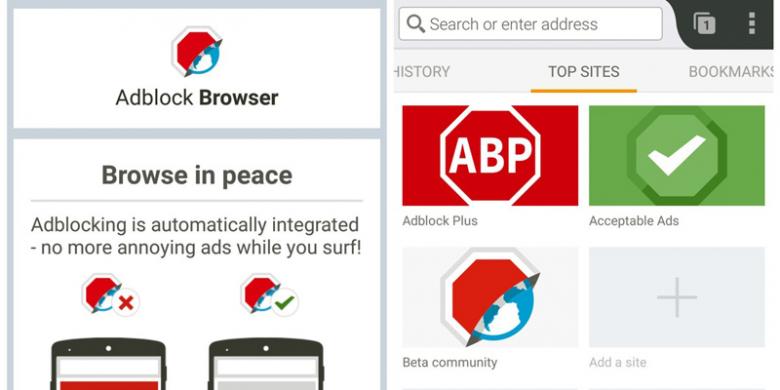
Kompas.com - Aplikasi pemblokir iklan di platform Android buatan AdBlock Plus dahulu sempat beredar di toko aplikasi Android, Play Store. Aplikasi tersebut kemudian dilarang oleh Google dan dihapus.
Kini, AdBlock Plus merilis AdBlock Browser, aplikasi browser di Android yang menangkal setiap iklan yang ditampilkan di halaman web.
Namun, Adblock Browser untuk saat ini belum bisa diunduh dari toko aplikasi Play Store. Pengguna yang berminat harus bergabung dulu dengan grup Google Plus dan mengikuti instruksi untuk mengunduhnya.
Dikutip KompasTekno dari Mashable, Kamis (21/5/2015), selain menyediakan aplikasi browser pemblokir iklan di Android, perusahaan juga berharap di masa mendatang bisa merilisnya di versi iOS.
AdBlock Browser memiliki setting default yang akan memblokir setiap iklan yang dinilai tidak sesuai dengan panduan spesifik iklan yang boleh ditampilkan.
Perusahaan pengembangnya telah memiliki daftar putih yang secara otomatis tidak akan memblokir iklan di beberapa situs tertentu yang sesuai dengan kriteria yang ditetapkan, yaitu tidak tergolong mengganggu (intrusif).
Selain itu, pengguna juga memiliki pilihan untuk memblokir semua iklan melalui setting aplikasi.
AdBlock Browser tidak dibangun dari nol, melainkan menggunakan versi browser Mozilla Firefox, sehingga tampilannya menyerupai browser mobile tersebut.
"Dengan membuat browser kami sendiri, kami memiliki kebebasan mengintegrasikan pemblokir iklan sebagai fitur utama," ujar Felix Dahlke, perwakilan pengembang dari AdBlock.
"Tujuan kami kini adalah membangun browser yang solid dengan pemblokir iklan terintegrasi yang bagus pula," imbuhnya.
Kini, AdBlock Plus merilis AdBlock Browser, aplikasi browser di Android yang menangkal setiap iklan yang ditampilkan di halaman web.
Namun, Adblock Browser untuk saat ini belum bisa diunduh dari toko aplikasi Play Store. Pengguna yang berminat harus bergabung dulu dengan grup Google Plus dan mengikuti instruksi untuk mengunduhnya.
Dikutip KompasTekno dari Mashable, Kamis (21/5/2015), selain menyediakan aplikasi browser pemblokir iklan di Android, perusahaan juga berharap di masa mendatang bisa merilisnya di versi iOS.
AdBlock Browser memiliki setting default yang akan memblokir setiap iklan yang dinilai tidak sesuai dengan panduan spesifik iklan yang boleh ditampilkan.
Perusahaan pengembangnya telah memiliki daftar putih yang secara otomatis tidak akan memblokir iklan di beberapa situs tertentu yang sesuai dengan kriteria yang ditetapkan, yaitu tidak tergolong mengganggu (intrusif).
Selain itu, pengguna juga memiliki pilihan untuk memblokir semua iklan melalui setting aplikasi.
AdBlock Browser tidak dibangun dari nol, melainkan menggunakan versi browser Mozilla Firefox, sehingga tampilannya menyerupai browser mobile tersebut.
"Dengan membuat browser kami sendiri, kami memiliki kebebasan mengintegrasikan pemblokir iklan sebagai fitur utama," ujar Felix Dahlke, perwakilan pengembang dari AdBlock.
"Tujuan kami kini adalah membangun browser yang solid dengan pemblokir iklan terintegrasi yang bagus pula," imbuhnya.
Feb 5, 2015
Begini Cara Bikin Android Tampil Mirip iOS
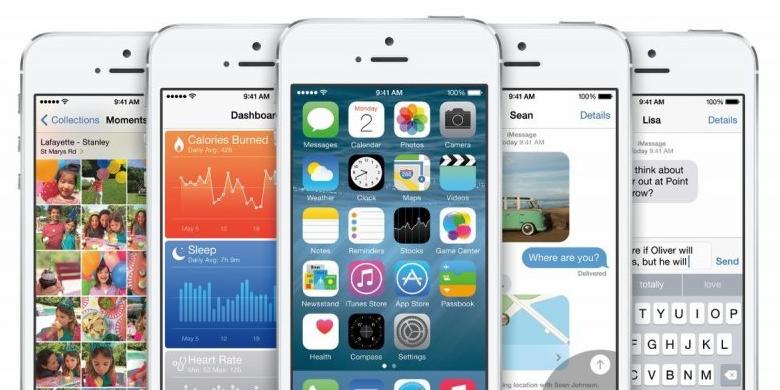
Kompas.com - Jatuh cinta pada tampilan antarmuka iOS, tak selalu berarti harus langsung ganti menggunakan smartphone besutan Apple itu. Pengguna Android, sebenarnya bisa dengan mudah mengubah tampilan antarmuka gadget-nya supaya mirip iOS.
Di dalam Google Play Store, terdapat sejumlah aplikasi yang bisa mengubah tampilan Android jadi mirip dengan iOS. Modifikasi itu pun bisa terjadi seutuhnya atau hanya pada bagian-bagian tertentu saja. Semua kembali pada pilihan pengguna.
Seperti yang KompasTekno rangkum dari Phone Arena, Senin (26/1/2015), berikut ini KompasTekno rangkum sejumlah aplikasi yang bisa Anda unduh gratis via Google Play Store untuk mebuat Android jadi rasa iOS:
1. Ubah lock screen
Salah satu bagian penting untuk mencipkatan cita rasa iOS adalah Lock Screen. Apple membuat iOS memiliki fitur lock screen khas berupa Slide to Unlock. Fitur ini bisa saja ditiru, menggunakan aplikasi HI Lockscreen atau OS 8 Lockscreen.
HI Lockscreen akan membuat tampilan lockscreen berubah menjadi mirip iOS 8. Penunjuk waktu berada di tengah layar dan menggunakan font khas Apple.
Di dalam Google Play Store, terdapat sejumlah aplikasi yang bisa mengubah tampilan Android jadi mirip dengan iOS. Modifikasi itu pun bisa terjadi seutuhnya atau hanya pada bagian-bagian tertentu saja. Semua kembali pada pilihan pengguna.
Seperti yang KompasTekno rangkum dari Phone Arena, Senin (26/1/2015), berikut ini KompasTekno rangkum sejumlah aplikasi yang bisa Anda unduh gratis via Google Play Store untuk mebuat Android jadi rasa iOS:
1. Ubah lock screen
Salah satu bagian penting untuk mencipkatan cita rasa iOS adalah Lock Screen. Apple membuat iOS memiliki fitur lock screen khas berupa Slide to Unlock. Fitur ini bisa saja ditiru, menggunakan aplikasi HI Lockscreen atau OS 8 Lockscreen.
HI Lockscreen akan membuat tampilan lockscreen berubah menjadi mirip iOS 8. Penunjuk waktu berada di tengah layar dan menggunakan font khas Apple.
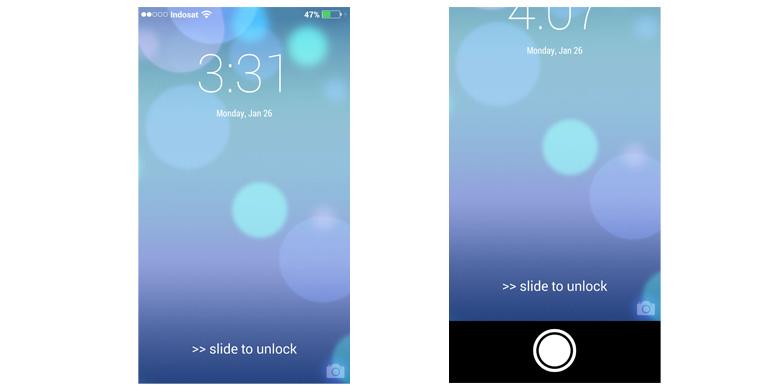
Di sisi kiri atas terdapat penunjuk sinyal serta nama jaringan operator yang dipakai. Sementara di kanan atas terdapat indikator baterai.
Bergeser ke bawah, lockscreen ini juga menampilkan tulisan Slide to Unlock yang khas di iPhone. Sedangkan di sisi kanan bawahnya terdapat icon kamera. Fungsi icon kamera ini tentu saja sebagai pemintas untuk aplikasi fotografi itu. Pengguna cukup menggesernya ke atas saja.
Berikutnya, aplikasi OS 8 Lockscreen, punya tampilan serupa. Perbedaannya adalah huruf-huruf pada tulisan Slide to Unlock berukuran lebih besar. Kemudian pada sisi kiri atas layar tidak ada indikator sinyal; cuma ada nama jaringan operator saja.
2. Ubah tampilan icon
Tampilan ikon pada antarmuka Android dapat diubah menggunakan aplikasi launcher. Ada dua apliaksi yang bisa digunakan, yaitu 8 Launcher dan IO Launcher.
8 Launcher menggunakan ikon-ikon yang mirip dengan iOS, meski tidak 100 persen. Launcher yang satu ini punya kinerja yang ringan plus transisi antar layar yang mulus.
Namun tidak semua aplikasi akan berubah menggunakan icon ala iOS. Misalnya, icon peramban Google Chrome yang hanya dibungkus kotak saja dan diberi nama Browser. Kemudian pada bagian jam yang cenderung polos, padahal jam pada iOS memiliki corak-corak penunjuk waktu.
Secara keseluruhan, 8 Launcher cukup menarik untuk mengubah Android jadi mirip iOS.
Aplikasi kedua adalah IO Launcher. Aplikasi ini tidak utuh mengubah icon serta antarmuka Android. Cara kerjanya justru memadukan icon-icon ala iOS dengan Android.
Bergeser ke bawah, lockscreen ini juga menampilkan tulisan Slide to Unlock yang khas di iPhone. Sedangkan di sisi kanan bawahnya terdapat icon kamera. Fungsi icon kamera ini tentu saja sebagai pemintas untuk aplikasi fotografi itu. Pengguna cukup menggesernya ke atas saja.
Berikutnya, aplikasi OS 8 Lockscreen, punya tampilan serupa. Perbedaannya adalah huruf-huruf pada tulisan Slide to Unlock berukuran lebih besar. Kemudian pada sisi kiri atas layar tidak ada indikator sinyal; cuma ada nama jaringan operator saja.
2. Ubah tampilan icon
Tampilan ikon pada antarmuka Android dapat diubah menggunakan aplikasi launcher. Ada dua apliaksi yang bisa digunakan, yaitu 8 Launcher dan IO Launcher.
8 Launcher menggunakan ikon-ikon yang mirip dengan iOS, meski tidak 100 persen. Launcher yang satu ini punya kinerja yang ringan plus transisi antar layar yang mulus.
Namun tidak semua aplikasi akan berubah menggunakan icon ala iOS. Misalnya, icon peramban Google Chrome yang hanya dibungkus kotak saja dan diberi nama Browser. Kemudian pada bagian jam yang cenderung polos, padahal jam pada iOS memiliki corak-corak penunjuk waktu.
Secara keseluruhan, 8 Launcher cukup menarik untuk mengubah Android jadi mirip iOS.
Aplikasi kedua adalah IO Launcher. Aplikasi ini tidak utuh mengubah icon serta antarmuka Android. Cara kerjanya justru memadukan icon-icon ala iOS dengan Android.
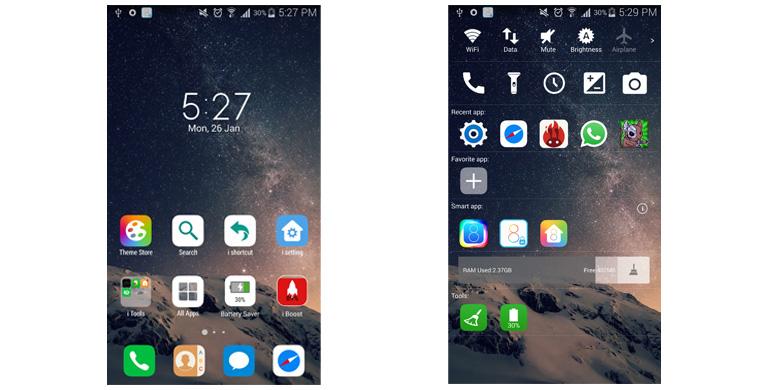
Selain icon yang mirip iOS, aplikasi ini juga memiliki sidebar berisi berbagai fitur seperti Bluetooth, WiFi dan lain-lain. Pengguna juga bisa memasang tools tertentu, icon buatan pihak ketiga atau pengaturan lain.
3. Ganti keyboard
3. Ganti keyboard
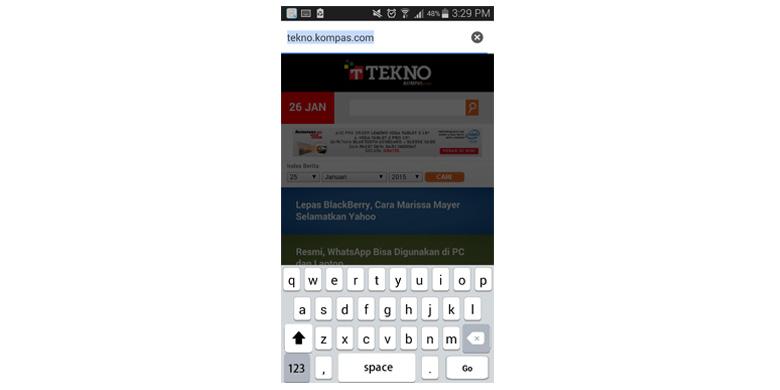
Terakhir, sebaiknya Anda segera mengubah keyboard yang digunakan untuk mengetik. Keyboard yang mirip dengan Apple adalah aplikasi bernama Classic Keyboard. Aplikasi ini akan menumbuhkan cita rasa mirip dengan iPhone. Ada juga fitur tambahan berupa prediksi teks serta getaran dan suara saat mengetik.
Feb 4, 2015
Yuk, Coba Taklukkan TTS "Kompas" di Android dan iPhone
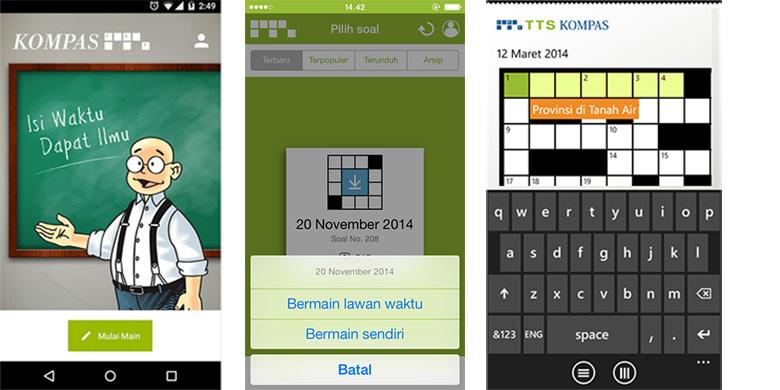
Kompas.com - Teka-teki silang (TTS) harian Kompas yang disisipkan tiap edisi Minggu selalu menantang pembaca untuk mengasah otak dalam mengisi soal-soalnya.
Kini, pengguna gadget Android dan iOS bisa menjajal kemampuan mengisi TTS Kompas setiap saat lewat aplikasi mobile game yang tersedia di toko Google Play dan App Store.
Mobile game TTS Kompas yang dikembangkan dalam native environment untuk masing-masing platform ini dapat dimainkan di smartphone maupun tablet, sesuai dengan keinginan dan kenyamanan pengguna.
Setelah mengunduh game TTS Kompas, pengguna dipersilakan membuat akun Kompas ID agar dapat memamerkan prestasi skor yang diraih di leader board. Hal tersebut juga akan menciptakan persaingan di antara pemain.
Akun Kompas ID sekaligus membuka akses ke soal premium dan soal berhadiah yang dihadirkan sesuai program dari harian Kompas. Pemain bisa juga mengisi TTS dalam mode offline setelah soal selesai diunduh.
Dalam menyelesaikan soal TTS, ada dua tipe bermain yang tersedia. Tipe permainan "hitung waktu" akan mencatat lamanya waktu yang dibutuhkan pemain dalam menyelesaikan semua soal dengan benar.
Tipe permainan kedua adalah "tanpa waktu" yang memungkinkan pengguna bermain lebih santai dan tidak dikejar target.
Beberapa fitur yang dapat membantu pemain menyelesaikan soal turut disediakan. Fitur "Hint", misalnya, dapat memberi petunjuk tambahan atas sebuah jawaban, sementara "Cek Jawaban" dipakai untuk memastikan kebenaran jawaban.
Selain di platform Android dan iOS, game TTS Kompas tersedia untuk pengguna perangkat Windows Phone lewat toko aplikasi Windows Store.
Kini, pengguna gadget Android dan iOS bisa menjajal kemampuan mengisi TTS Kompas setiap saat lewat aplikasi mobile game yang tersedia di toko Google Play dan App Store.
Mobile game TTS Kompas yang dikembangkan dalam native environment untuk masing-masing platform ini dapat dimainkan di smartphone maupun tablet, sesuai dengan keinginan dan kenyamanan pengguna.
Setelah mengunduh game TTS Kompas, pengguna dipersilakan membuat akun Kompas ID agar dapat memamerkan prestasi skor yang diraih di leader board. Hal tersebut juga akan menciptakan persaingan di antara pemain.
Akun Kompas ID sekaligus membuka akses ke soal premium dan soal berhadiah yang dihadirkan sesuai program dari harian Kompas. Pemain bisa juga mengisi TTS dalam mode offline setelah soal selesai diunduh.
Dalam menyelesaikan soal TTS, ada dua tipe bermain yang tersedia. Tipe permainan "hitung waktu" akan mencatat lamanya waktu yang dibutuhkan pemain dalam menyelesaikan semua soal dengan benar.
Tipe permainan kedua adalah "tanpa waktu" yang memungkinkan pengguna bermain lebih santai dan tidak dikejar target.
Beberapa fitur yang dapat membantu pemain menyelesaikan soal turut disediakan. Fitur "Hint", misalnya, dapat memberi petunjuk tambahan atas sebuah jawaban, sementara "Cek Jawaban" dipakai untuk memastikan kebenaran jawaban.
Selain di platform Android dan iOS, game TTS Kompas tersedia untuk pengguna perangkat Windows Phone lewat toko aplikasi Windows Store.
Jan 9, 2015
Android app stops smartphone spies
 |
| They won't know that you know that they know. |
Foxnews.com - You're not paranoid if they really are listening. A new Android app can detect surveillance attempts on your smartphone, including IMSI catchers (also called "stingrays"), hidden text messages and attacks exploiting the telephone-signal protocol known as Signaling System 7 (SS7).
Called SnoopSnitch, the app launched for free on the Google Play store Dec. 29. It can't protect your phone from snooping, but it can tell you that the snooping is happening.
IMSI catchers disguise themselves as legitimate cell towers, tricking GSM mobile phones into connecting to them and forwarding outgoing calls to the legitimate phone network. IMSI catchers can eavesdrop on calls and texts, extract personal data from connected phones and track phones' physical locations.
Law-enforcement agencies, such as the FBI, use stingrays in investigations, and a recent informal survey revealed more than a dozen IMSI catchers spread across the United States. The devices are so frequently used that the StingRay brand name used by a top manufacturer of IMSI catchers already applies generically.
Enter SnoopSnitch. The app was developed by German mobile-phone security researchers Karsten Nohl, Tobias Engel and Alex Senier, all of Berlin-based security company SRLabs, and was introduced in their presentation at the Chaos Computer Congress security conference in Hamburg Dec. 27.
SnoopSnitch can tell when a mobile device is switching from a legitimate cell tower to IMSI catcher, the researchers explained in their talk entitled "Mobile Self-Defense (SnoopSnitch)." Nohl also described SnoopSnitch as a "catcher catcher" in an interview with tech news site Motherboard.
Though it is free on the Google Play Store, not all Android devices will work with SnoopSnitch, as the app requires a Qualcomm chipset such a Snapdragon system-on-a-chip. A list of tested SnoopSnitch compatible devices is on the SRLabs website.
Many Sony and Samsung smartphones have Qualcomm chipsets, including the Samsung Galaxy S5, although SRLabs hasn't tested most of them for compatibility. Compatible devices also need to be rooted, run stock Android 4.1 or later rather than manufacturer or carrier builds, and, naturally, use the GSM carrier protocol (AT&T and T-Mobile) instead of CDMA (Sprint and Verizon Wireless).
Called SnoopSnitch, the app launched for free on the Google Play store Dec. 29. It can't protect your phone from snooping, but it can tell you that the snooping is happening.
IMSI catchers disguise themselves as legitimate cell towers, tricking GSM mobile phones into connecting to them and forwarding outgoing calls to the legitimate phone network. IMSI catchers can eavesdrop on calls and texts, extract personal data from connected phones and track phones' physical locations.
Law-enforcement agencies, such as the FBI, use stingrays in investigations, and a recent informal survey revealed more than a dozen IMSI catchers spread across the United States. The devices are so frequently used that the StingRay brand name used by a top manufacturer of IMSI catchers already applies generically.
Enter SnoopSnitch. The app was developed by German mobile-phone security researchers Karsten Nohl, Tobias Engel and Alex Senier, all of Berlin-based security company SRLabs, and was introduced in their presentation at the Chaos Computer Congress security conference in Hamburg Dec. 27.
SnoopSnitch can tell when a mobile device is switching from a legitimate cell tower to IMSI catcher, the researchers explained in their talk entitled "Mobile Self-Defense (SnoopSnitch)." Nohl also described SnoopSnitch as a "catcher catcher" in an interview with tech news site Motherboard.
Though it is free on the Google Play Store, not all Android devices will work with SnoopSnitch, as the app requires a Qualcomm chipset such a Snapdragon system-on-a-chip. A list of tested SnoopSnitch compatible devices is on the SRLabs website.
Many Sony and Samsung smartphones have Qualcomm chipsets, including the Samsung Galaxy S5, although SRLabs hasn't tested most of them for compatibility. Compatible devices also need to be rooted, run stock Android 4.1 or later rather than manufacturer or carrier builds, and, naturally, use the GSM carrier protocol (AT&T and T-Mobile) instead of CDMA (Sprint and Verizon Wireless).
Dec 6, 2014
Daftar Aplikasi Android Terbaik 2014 Versi Google
Kompas.com - Merasa kesulitan dalam memilih aplikasi terbaik untuk dipasangkan di ponsel Android? Hal tersebut wajar terjadi, mengingat jumlah aplikasi yang telah mencapai angka satu juta di toko Google Play.
Nah, untuk membantu para penggunanya yang kesulitan, Google merilis sebuah daftar berisikan 75 aplikasi yang dianggap terbaik di tahun 2014 ini. Harapannya, pengguna sistem operasi mobile berlogo robot itu memiliki acuan memilih aplikasi.
Menurut pantauan KompasTekno, Rabu (3/12/2014), aplikasi yang ada dalam daftar tersebut terbagi dalam berbagai kategori, seperti produktivitas, hiburan, dan musik.
Sebagian besar aplikasi yang ada dalam daftar tersebut tersedia secara gratis. Ada juga aplikasi berbayar. Meskipun begitu, harga jual dari aplikasi tersebut tidak terlalu tinggi, hanya di bawah Rp 50.000.
Berikut 75 aplikasi terbaik tahun 2014 pilihan Google:
Produktivitas
- Wunderlist: To-Do List & Tasks
- SwiftKey Keyboard
- IFTTT (If This, Then That)
- Sunrise Calendar
- Todoist: To-Do List, Task List
- Mailbox
- Offtime – Life Unplugged
- Rundavoo
- Money Tracker by BillGuard
- SlideShare Presentations
- Strive
Edukasi
- TED
- Lumosity
- Duolingo
- Craftsy Classes
- Monki Chinese Class
- Child Mode & Time Education
- Amazing World Atlas
Hiburan
- Hulu
- Comedy Central
- Disney Movies Anywhere
- DramaFever
- 5by
- Dailymotion
Berita
- Yahoo News Digest
- BuzzFeed
- The Economist
- CNN
- New York Times
- Watchup: Your Daily Newscast
Music & Audio
- Shazam
- Pandora
- iHeartRadio
- Afterlight
- Musixmatch Music Player Lyrics
- djay 2
- TuneIn Radio
- Soundhound
- edjing – DJ Music
- Equalizer + MP3 player volume
- Ultimate Guitar
Olahraga & Fitness
- Onefootball – Pure Soccer!
- Golfshot: Golf GPS
- Univision Deportes
- 7 Minute Workout
- Google Fit
Belanja
- Wish
- Groupon
Fotografi
- Over
- EyeEm: Camera & Photo Filter
- Facetune
- Carousel – Dropbox Photos
- Video Collage Maker
- Camera Zoom
Personalisasi
- Locket Lock Screen
- Link Bubble Browser
Sosial
- Timehop
- OKCupid
- Secret
- LINK – with people nearby
- Frontback
- Obscure
- Lettrs
- Telegram
- Samba: Videos + Reactions
- Bitmoji
- Skype Qik: Group Video Chat
- Viadeo
Travel
- Expedia
- Maps.ME
- Anywayanyday
- Minube
- Windfinder
- Uber
Nah, untuk membantu para penggunanya yang kesulitan, Google merilis sebuah daftar berisikan 75 aplikasi yang dianggap terbaik di tahun 2014 ini. Harapannya, pengguna sistem operasi mobile berlogo robot itu memiliki acuan memilih aplikasi.
Menurut pantauan KompasTekno, Rabu (3/12/2014), aplikasi yang ada dalam daftar tersebut terbagi dalam berbagai kategori, seperti produktivitas, hiburan, dan musik.
Sebagian besar aplikasi yang ada dalam daftar tersebut tersedia secara gratis. Ada juga aplikasi berbayar. Meskipun begitu, harga jual dari aplikasi tersebut tidak terlalu tinggi, hanya di bawah Rp 50.000.
Berikut 75 aplikasi terbaik tahun 2014 pilihan Google:
Produktivitas
- Wunderlist: To-Do List & Tasks
- SwiftKey Keyboard
- IFTTT (If This, Then That)
- Sunrise Calendar
- Todoist: To-Do List, Task List
- Mailbox
- Offtime – Life Unplugged
- Rundavoo
- Money Tracker by BillGuard
- SlideShare Presentations
- Strive
Edukasi
- TED
- Lumosity
- Duolingo
- Craftsy Classes
- Monki Chinese Class
- Child Mode & Time Education
- Amazing World Atlas
Hiburan
- Hulu
- Comedy Central
- Disney Movies Anywhere
- DramaFever
- 5by
- Dailymotion
Berita
- Yahoo News Digest
- BuzzFeed
- The Economist
- CNN
- New York Times
- Watchup: Your Daily Newscast
Music & Audio
- Shazam
- Pandora
- iHeartRadio
- Afterlight
- Musixmatch Music Player Lyrics
- djay 2
- TuneIn Radio
- Soundhound
- edjing – DJ Music
- Equalizer + MP3 player volume
- Ultimate Guitar
Olahraga & Fitness
- Onefootball – Pure Soccer!
- Golfshot: Golf GPS
- Univision Deportes
- 7 Minute Workout
- Google Fit
Belanja
- Wish
- Groupon
Fotografi
- Over
- EyeEm: Camera & Photo Filter
- Facetune
- Carousel – Dropbox Photos
- Video Collage Maker
- Camera Zoom
Personalisasi
- Locket Lock Screen
- Link Bubble Browser
Sosial
- Timehop
- OKCupid
- Secret
- LINK – with people nearby
- Frontback
- Obscure
- Lettrs
- Telegram
- Samba: Videos + Reactions
- Bitmoji
- Skype Qik: Group Video Chat
- Viadeo
Travel
- Expedia
- Maps.ME
- Anywayanyday
- Minube
- Windfinder
- Uber
Oct 30, 2014
Windows Phone Flashlight apps are spying on users Android, iOS, Windows Phone smartphones, is yours on the list?

Techtimes.com - That innocent Flashlight App you installed on your device to shed light on certain situations is also spying on you, and potentially selling or using your personal data. Especially vulnerable are Android devices.
Gary Miliefsky of cyber security firm Snoopbit, says, "'We've all become victims of installing many apps on our smartphones and tablets that do much more than the service they should provide. We have opened a Pandora's Box to online predators, cyber criminals and spies - all through these apps we foolishly trust."
The firm did a study of the top ten Android flashlight apps and found that when downloaded they are given permission to access sensitive user information that clearly has nothing to do with their function as a simple flashlight for their users.
The company tested the top ten flashlight apps on Android and determined that each and every one of them collects unnecessary user data and accesses areas of the device wholly unrelated to the function of the app. The offending apps include: Super Bright LED flashlight, Brightest Flashlight Free, Tiny Flashlight + LED, Flashlight, Brightest LED Flashlight, Color Flashlight, High Powered Flashlight, Flashlight HD LED and Flashlight: LED Torchlight. A chart on the company's website specifically breaks down the areas to which the app is permitted access.
Regarding the flashlight apps, the firm warns, "Some appear specifically designed to collect and expose your personal information to cybercriminals or other nation states. In addition, you are at significant risk if you are doing Mobile Banking on the same device as one of these free Flashlight Apps."
Many of the apps have the ability to read phone status and identity, view Wi-Fi connections, modify system settings, obtain full network access, and determine your precise location via your phone's GPS, among other permissions. The company recommends you uninstall your flashlight app immediately in order to protect your device's data and info.
While the firm concludes that the pre-installed iPhone flashlight app seems safe, third-party apps on Windows Phone and at the iTunes store are also accessing unnecessary sensitive user data and location information, and unnecessarily using the internet, collecting data and building user profiles. Apps using iOS and Windows Phone OS are not as dangerous as those running Android, however, and cannot "hide in the background", according to Snoopbit.
Gary Miliefsky of cyber security firm Snoopbit, says, "'We've all become victims of installing many apps on our smartphones and tablets that do much more than the service they should provide. We have opened a Pandora's Box to online predators, cyber criminals and spies - all through these apps we foolishly trust."
The firm did a study of the top ten Android flashlight apps and found that when downloaded they are given permission to access sensitive user information that clearly has nothing to do with their function as a simple flashlight for their users.
The company tested the top ten flashlight apps on Android and determined that each and every one of them collects unnecessary user data and accesses areas of the device wholly unrelated to the function of the app. The offending apps include: Super Bright LED flashlight, Brightest Flashlight Free, Tiny Flashlight + LED, Flashlight, Brightest LED Flashlight, Color Flashlight, High Powered Flashlight, Flashlight HD LED and Flashlight: LED Torchlight. A chart on the company's website specifically breaks down the areas to which the app is permitted access.
Regarding the flashlight apps, the firm warns, "Some appear specifically designed to collect and expose your personal information to cybercriminals or other nation states. In addition, you are at significant risk if you are doing Mobile Banking on the same device as one of these free Flashlight Apps."
Many of the apps have the ability to read phone status and identity, view Wi-Fi connections, modify system settings, obtain full network access, and determine your precise location via your phone's GPS, among other permissions. The company recommends you uninstall your flashlight app immediately in order to protect your device's data and info.
While the firm concludes that the pre-installed iPhone flashlight app seems safe, third-party apps on Windows Phone and at the iTunes store are also accessing unnecessary sensitive user data and location information, and unnecessarily using the internet, collecting data and building user profiles. Apps using iOS and Windows Phone OS are not as dangerous as those running Android, however, and cannot "hide in the background", according to Snoopbit.
Feb 25, 2014
Feb 23, 2014
BBM Hadir Juga di Android Gingerbread
Kompas.com - Sesuai janjinya akhir Januari lalu, hari Rabu (19/2/2014) ini, BlackBerry meluncurkan aplikasi pesan instan BlackBerry Messenger untuk sistem operasi Android lawas "Gingerbread".
BBM untuk Android sudah bisa diunduh di toko aplikasi Google Play Store. Bisa pula diperoleh dengan mengakses situs www.BBM.com dari ponsel Android yang bersangkutan.
BBM bisa dijalankan pada OS Android "Gingerbread" mulai versi 2.3.3 ke atas.
Sebelumnya, aplikasi BBM hanya bisa dijalankan pada smartphone yang dilengkapi OS Android "Ice Cream Sandwich" (versi 4.0) ke atas. Kini, para pemilik perangkat "Gingerbread" bisa ikut nimbrung dalam percakapan di aplikasi chatting populer itu.
OS Android Gingerbread sendiri hingga kini memang masih banyak digunakan, meski sudah berumur tiga tahun sejak diluncurkan pada Februari 2011.
"Dengan senang hati, kami menyambut banyak pengguna baru ke komunitas BBM, lewat 21 persen basis pengguna Android di seluruh dunia yang menjalankan Gingerbread," ujar kepala produk dan pemasaran BBM, Jeff Gadway, dalam sebuah posting di blog BlackBerry.
Dengan kata lain, Jumlah gadget berbasis "Roti Jahe" yang beredar hingga kini mencapai seperlima dari total populasi perangkat Android. Angka tersebut bahkan masih lebih besar dibandingkan Android "Ice Cream Sandwich" yang lebih baru dari Gingerbread.
BBM untuk Android sudah bisa diunduh di toko aplikasi Google Play Store. Bisa pula diperoleh dengan mengakses situs www.BBM.com dari ponsel Android yang bersangkutan.
BBM bisa dijalankan pada OS Android "Gingerbread" mulai versi 2.3.3 ke atas.
Sebelumnya, aplikasi BBM hanya bisa dijalankan pada smartphone yang dilengkapi OS Android "Ice Cream Sandwich" (versi 4.0) ke atas. Kini, para pemilik perangkat "Gingerbread" bisa ikut nimbrung dalam percakapan di aplikasi chatting populer itu.
OS Android Gingerbread sendiri hingga kini memang masih banyak digunakan, meski sudah berumur tiga tahun sejak diluncurkan pada Februari 2011.
"Dengan senang hati, kami menyambut banyak pengguna baru ke komunitas BBM, lewat 21 persen basis pengguna Android di seluruh dunia yang menjalankan Gingerbread," ujar kepala produk dan pemasaran BBM, Jeff Gadway, dalam sebuah posting di blog BlackBerry.
Dengan kata lain, Jumlah gadget berbasis "Roti Jahe" yang beredar hingga kini mencapai seperlima dari total populasi perangkat Android. Angka tersebut bahkan masih lebih besar dibandingkan Android "Ice Cream Sandwich" yang lebih baru dari Gingerbread.
Jan 30, 2014
Survei 'Jokowi': 85,51% Setuju Jokowi Jadi Presiden
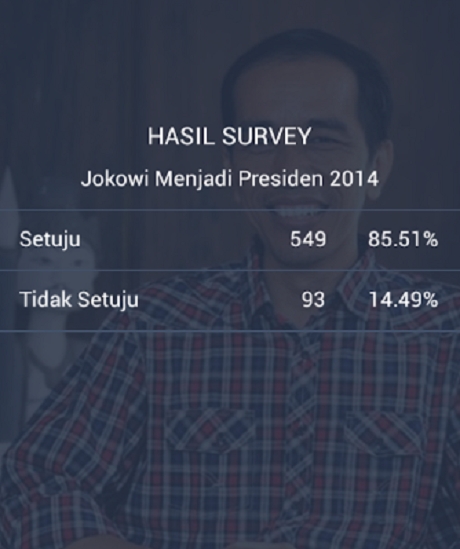
Detik.com - Elektabilitas Gubernur DKI moncer di berbagai survei. Belakangan di jagat Android juga muncul aplikasi survei pencapresan Jokowi, hasilnya ada 85,51% user aplikasi itu setuju Jokowi jadi presiden.
Aplikasi ini bisa dijumpai di toko aplikasi di ponsel Android. Nama aplikasi ini simpel, Jokowi. Yang mengunduh aplikasi ini sudah lebih dari 600 user. Sejumlah pertanyaan seputar Jokowi diajukan dan user diberi kesempatan untuk mengklik jawaban antara setuju dan tidak setuju.
Saat diakses pada Rabu (29/1/2014), pukul 13.15 WIB, aplikasi polling sederhana ini menunjukkan 85,51% penggunanya setuju Jokowi jadi presiden. Hanya 14,49% pengguna yang menjawab tidak setuju Jokowi jadi presiden.
Selain itu 'disurvei' pula alasan mengapa setuju pencapresan Jokowi. Sebanyak 74,09% menyebut Jokowi sebagai figur yang jujur dan sederhana, 21,42% menyebut bahwa Jokowi dekat dengan rakyat, selain itu 3,10% menyatakan bahwa Jokowi tokoh idolanya, dan 1,09% menyatakan tidak tahu.
Aplikasi ini juga mensurvei pasangan yang cocok jadi pendamping Jokowi. Ada nama-nama yang disiapkan.
Sebanyak 31,7% memilih Prabowo Subianto jadi cawapres Jokowi dan disusul oleh Dahlan Iskan yang memeroleh 27,92%.
Untuk kategori calon presiden selain Jokowi, sebanyak 39,78% menyebut Prabowo dan 26,88% menyebut tak ada yang pantas selain Jokowi.
Siapa pembuat apikasi ini?
Aplikasi ini bisa dijumpai di toko aplikasi di ponsel Android. Nama aplikasi ini simpel, Jokowi. Yang mengunduh aplikasi ini sudah lebih dari 600 user. Sejumlah pertanyaan seputar Jokowi diajukan dan user diberi kesempatan untuk mengklik jawaban antara setuju dan tidak setuju.
Saat diakses pada Rabu (29/1/2014), pukul 13.15 WIB, aplikasi polling sederhana ini menunjukkan 85,51% penggunanya setuju Jokowi jadi presiden. Hanya 14,49% pengguna yang menjawab tidak setuju Jokowi jadi presiden.
Selain itu 'disurvei' pula alasan mengapa setuju pencapresan Jokowi. Sebanyak 74,09% menyebut Jokowi sebagai figur yang jujur dan sederhana, 21,42% menyebut bahwa Jokowi dekat dengan rakyat, selain itu 3,10% menyatakan bahwa Jokowi tokoh idolanya, dan 1,09% menyatakan tidak tahu.
Aplikasi ini juga mensurvei pasangan yang cocok jadi pendamping Jokowi. Ada nama-nama yang disiapkan.
Sebanyak 31,7% memilih Prabowo Subianto jadi cawapres Jokowi dan disusul oleh Dahlan Iskan yang memeroleh 27,92%.
Untuk kategori calon presiden selain Jokowi, sebanyak 39,78% menyebut Prabowo dan 26,88% menyebut tak ada yang pantas selain Jokowi.
Siapa pembuat apikasi ini?
Dec 20, 2013
Aplikasi Lacak Android Sudah Tersedia di Play Store
Kompas.com - Fitur Android Device Manager memang telah diperkenalkan oleh Google sejak Agustus lalu, namun baru versi web-nya saja. Kini, Google merilis aplikasi Android Device Manager ke Play Store, untuk digunakan di ponsel Android.
Aplikasi ini bisa digunakan untuk melacak smartphone Android yang hilang. Kemampuan seperti itu mengingatkan kita pada layanan Find My iPhone dari Apple. Fitur tersebut sudah tersedia di iPhone semenjak 2010.
Aplikasi Android Device Manager di Android memiliki antarmuka seperti versi web. Pengguna bisa melacak perangkat Android di peta, melihat terakhir ada di mana, dan kapan digunakan. Google mengklaim aplikasi ini bisa melacak semua perangkat yang memiliki sebuah akun Google.
Selain melacak lokasi, pengguna bisa mengunci layar, mengganti password PIN, atau bahkan menghapus data. Semua bisa dilakukan dari jarak jauh.
Pengguna sebenarnya juga bisa menggunakan Android Device Manager dengan browser di Android, namun aplikasi yang dirancang khusus ini lebih nyaman digunakan. Antarmukanya bisa menyesuaikan ukuran layar yang dimiliki perangkat.
Terdapat juga dropdown menu untuk berganti akun. Aplikasi juga berjalan lebih cepat dibanding versi web-nya.
Namun, aplikasi tersebut nampaknya kurang sesuai jika digunakan di versi mobile. Menggunakan aplikasi di web akan jauh lebih masuk akal, karena jika kita kehilangan smartphone, maka aplikasi di dalamnya tak bisa digunakan untuk melacak. Kecuali jika pengguna memiliki lebih dari satu smartphone Android atau tablet.
Aplikasi ini bisa digunakan untuk melacak smartphone Android yang hilang. Kemampuan seperti itu mengingatkan kita pada layanan Find My iPhone dari Apple. Fitur tersebut sudah tersedia di iPhone semenjak 2010.
Aplikasi Android Device Manager di Android memiliki antarmuka seperti versi web. Pengguna bisa melacak perangkat Android di peta, melihat terakhir ada di mana, dan kapan digunakan. Google mengklaim aplikasi ini bisa melacak semua perangkat yang memiliki sebuah akun Google.
Selain melacak lokasi, pengguna bisa mengunci layar, mengganti password PIN, atau bahkan menghapus data. Semua bisa dilakukan dari jarak jauh.
Pengguna sebenarnya juga bisa menggunakan Android Device Manager dengan browser di Android, namun aplikasi yang dirancang khusus ini lebih nyaman digunakan. Antarmukanya bisa menyesuaikan ukuran layar yang dimiliki perangkat.
Terdapat juga dropdown menu untuk berganti akun. Aplikasi juga berjalan lebih cepat dibanding versi web-nya.
Namun, aplikasi tersebut nampaknya kurang sesuai jika digunakan di versi mobile. Menggunakan aplikasi di web akan jauh lebih masuk akal, karena jika kita kehilangan smartphone, maka aplikasi di dalamnya tak bisa digunakan untuk melacak. Kecuali jika pengguna memiliki lebih dari satu smartphone Android atau tablet.
Oct 26, 2013
Nexus 7 is the best Android tablet

Cnn.com - Google's new Nexus 7 tablet isn't just the best small Android tablet you can buy. It's the best Android tablet, period.
The popular mini tablet, which Google (GOOG, Fortune 500) first released last year, has only improved with the arrival of the second iteration.
Blazing fast speed? Check. Slimmer, thinner and lighter? Check. Gorgeous, Retina-quality seven-inch display? Check. The purest and most up-to-date version of Android. Check. World-beating value at $230? Jackpot.
For the value, it's CNNMoney's Best in Tech for the small tablet category.
The base model Nexus 7 is now $30 more expensive than last year's version, but what you're getting in return are some of the best guts any tablet has to offer on the inside, which translates into beautiful results on outside. It's the same price as the similar, but slightly less-thrilling Amazon (AMZN, Fortune 500) Kindle Fire HDX, and it's $169 cheaper than the new iPad mini (which we haven't yet reviewed).
The Nexus 7's display is as excellent as anything you'll find on any mobile device, big or small. The screen has excellent viewing angles, satisfying brightness and contrast (rich colors, deep blacks and bright whites), and good color accuracy.
The Nexus 7's marriage of impressive power and a gorgeous display really pays off when you're running an app that uses each pixel and every bit of the tablet's processing speed to the fullest, such as the EA (EA) game Real Racing 3.
It's also just as good for more mundane activities. Weighing only 0.64 pounds, and occupying the footprint of a stretched out e-reader, the Nexus 7 is quite good for reading.
One caveat: The bezels running the length of the device are noticeably slimmer on this year's model, When holding the tablet vertically in portrait mode, the narrower bezel makes one-handed page turning a bit awkward. It's not that it's an impossible feat, but it takes some getting used to -- and self-assuring that the tablet isn't going to slip out of your hand.
Conversely, the bezels running the width of the tablet are thicker than before. This gives the device a bit of an awkward appearance, but it does make holding the tablet horizontally in landscape mode a bit more comfortable. For those who watch a lot of video on the go, this -- and the excellent screen -- will bring joy.
With a rubberized back, rounded corners and edges that creep up and envelop the Nexus 7 screen, the tablet looks and feels lot like Amazon's (AMZN, Fortune 500) Kindle Paperwhite e-reader, but with a little extra weight, size and performance. It easily fits in a pocket, and it is light enough -- if not quite short enough -- to make you forget you're carrying it around. It's an excellent companion for trains, planes, automobiles and anything in between.
Unless you're streaming high-definition movies non-stop with the brightness cranked all the way up, the Nexus 7 will get you through an entire day of use -- if not days of use. And even if you decide to tax the battery, it will still last you the better part of a work day.
The Nexus 7 also has stereo speakers and a 5-megapixel camera. Like most tablets, these are solid enough features to use in a pinch, but you'll be better served by using headphones and a smartphone camera.
Like Apple's (AAPL, Fortune 500) iPad Mini, the small size makes it a device best suited for consumption -- reading, watching, listening, browsing, and gaming -- rather than creation. If you're into word processing, spreadsheet making, sketching, drawing, a larger 10-inch tablet is the way to go.
Compared to the recently released Kindle Fire HDX, the Nexus 7 isn't nearly as powerful on paper. But because the software running on the Kindle Fire makes it only fractionally as capable as the Nexus 7 (especially in the gaming space), that extra power is mostly for naught.
It has been the same story for the past year with Android devices, but it's still just as true: the best devices aren't the ones pushing the limits of hardware power, but rather those which stay as close to the stock android experience as possible. The Nexus 7 is that tablet.
The popular mini tablet, which Google (GOOG, Fortune 500) first released last year, has only improved with the arrival of the second iteration.
Blazing fast speed? Check. Slimmer, thinner and lighter? Check. Gorgeous, Retina-quality seven-inch display? Check. The purest and most up-to-date version of Android. Check. World-beating value at $230? Jackpot.
For the value, it's CNNMoney's Best in Tech for the small tablet category.
The base model Nexus 7 is now $30 more expensive than last year's version, but what you're getting in return are some of the best guts any tablet has to offer on the inside, which translates into beautiful results on outside. It's the same price as the similar, but slightly less-thrilling Amazon (AMZN, Fortune 500) Kindle Fire HDX, and it's $169 cheaper than the new iPad mini (which we haven't yet reviewed).
The Nexus 7's display is as excellent as anything you'll find on any mobile device, big or small. The screen has excellent viewing angles, satisfying brightness and contrast (rich colors, deep blacks and bright whites), and good color accuracy.
The Nexus 7's marriage of impressive power and a gorgeous display really pays off when you're running an app that uses each pixel and every bit of the tablet's processing speed to the fullest, such as the EA (EA) game Real Racing 3.
It's also just as good for more mundane activities. Weighing only 0.64 pounds, and occupying the footprint of a stretched out e-reader, the Nexus 7 is quite good for reading.
One caveat: The bezels running the length of the device are noticeably slimmer on this year's model, When holding the tablet vertically in portrait mode, the narrower bezel makes one-handed page turning a bit awkward. It's not that it's an impossible feat, but it takes some getting used to -- and self-assuring that the tablet isn't going to slip out of your hand.
Conversely, the bezels running the width of the tablet are thicker than before. This gives the device a bit of an awkward appearance, but it does make holding the tablet horizontally in landscape mode a bit more comfortable. For those who watch a lot of video on the go, this -- and the excellent screen -- will bring joy.
With a rubberized back, rounded corners and edges that creep up and envelop the Nexus 7 screen, the tablet looks and feels lot like Amazon's (AMZN, Fortune 500) Kindle Paperwhite e-reader, but with a little extra weight, size and performance. It easily fits in a pocket, and it is light enough -- if not quite short enough -- to make you forget you're carrying it around. It's an excellent companion for trains, planes, automobiles and anything in between.
Unless you're streaming high-definition movies non-stop with the brightness cranked all the way up, the Nexus 7 will get you through an entire day of use -- if not days of use. And even if you decide to tax the battery, it will still last you the better part of a work day.
The Nexus 7 also has stereo speakers and a 5-megapixel camera. Like most tablets, these are solid enough features to use in a pinch, but you'll be better served by using headphones and a smartphone camera.
Like Apple's (AAPL, Fortune 500) iPad Mini, the small size makes it a device best suited for consumption -- reading, watching, listening, browsing, and gaming -- rather than creation. If you're into word processing, spreadsheet making, sketching, drawing, a larger 10-inch tablet is the way to go.
Compared to the recently released Kindle Fire HDX, the Nexus 7 isn't nearly as powerful on paper. But because the software running on the Kindle Fire makes it only fractionally as capable as the Nexus 7 (especially in the gaming space), that extra power is mostly for naught.
It has been the same story for the past year with Android devices, but it's still just as true: the best devices aren't the ones pushing the limits of hardware power, but rather those which stay as close to the stock android experience as possible. The Nexus 7 is that tablet.
Subscribe to:
Posts (Atom)